What’s Changing for Managers?
As part of our continual process improvements, we are updating the way leavers are processed within Oracle. Please review the key changes below with effect from 01 September 2026:
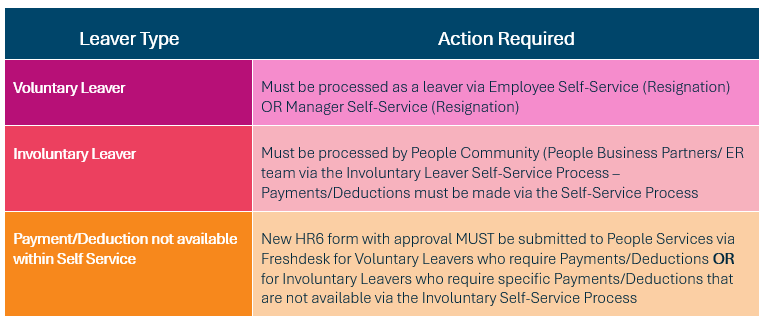
Summary Table
Manager Self Service & Employee Self Service
All voluntary leavers must now be processed using the Manager or Employee Self Service options in within Oracle.
Manager & Employee Self Service Termination Process Guides
Retirement of the Previous ‘HR11 Leavers Form’
The HR11 Leaver form previously submitted by managers and the People community for both voluntary and involuntary leavers will no longer be accepted by People Services as of 01 September 2026.
All leave types must now be managed via Oracle Self Service.
To replace the previous ‘HR11’ form, we have created a ‘HR6’ form – This form should be submitted for leavers that have already been terminated via Oracle Self-Service and require payments or deductions.
Any payments and deductions requested should be listed within the HR6 form and submitted to People Services with the relevant and compliant SODA approval.
If you have any questions or queries around appropriate approval, please contact you People Business Partner.
New HR6 Form – For Payments/Deductions Only
A new HR6 form has been created for Payments and Deductions only:
- This form does not include leaver information (e.g. notice periods, termination dates, termination reason, etc.).
- The leaver process itself (whether voluntary or involuntary) must be completed through Oracle Self Service.
- Use the new form only where additional payments or deductions are required that are not available through self-service, e.g.: PILON for Voluntary Leavers.
- Additional payments for involuntary that cannot be captured via the Involuntary self-service standard options.
- All required approvals (in line with the SODA) must be attached prior to submission.
Updated HR6 Form
The new HR6 Form for Payments/Deductions outside of the self-service process is available on the People Services Freshdesk Portal.
Submitting the New HR6 Form
Completed forms (with approvals) should be submitted to People Services via the Freshdesk Portal for processing.
How do I use the new HR6 form?
- You must process any voluntary resignations or voluntary leavers via Oracle self service prior to submitting the HR6 form to People Services.
- Once you have processed the leaver via Manager/Employee self service you will need to add the leavers details (Name and Employee Number)
- Add Payment/Deduction type in the ‘Element Name’ field.
- Use the ‘Payment or Deduction’ field to specify is a payment is owed to the leaver, or a deduction is being made.
- Use the ‘Payment Value’ field to add the amount of the payment/deduction.
- Use the ‘Payroll Effective Date’ to add a date that the payment/deduction should be made on – This should always be the 1st of the month that you are processing the leaver in. e.g. An employee who resigned on the 16 March 2026 should have the 01 March 2026 as the payroll effective date.
- Use the ‘Other Information’ box to detail any additional payments/deductions that must be made that are not available in the drop downs.
- Add in the leavers Manager Name and Job Title & the Approvers Name and Job Title.
- Submit the Form with approvals attached to the People Services Freshdesk Portal.
Involuntary Leavers
People Business Partner and ER may process involuntary leaver payments via self-service. Managers do not have access to this option at present.
Was this article helpful?
That’s Great!
Thank you for your feedback
Sorry! We couldn't be helpful
Thank you for your feedback
Feedback sent
We appreciate your effort and will try to fix the article